Skip to content
Absentee OwnersMOST POPULAR
An Absentee Owner owns a property but doesn't live there. This term usually refers to owners of vacant properties, not just landlords or rental owners.
Distressed Homeowner Leads
Distressed Homeowners, also known as pre-foreclosure, are residential properties where the owner has shown signs of being unable to keep up with financial obligations.
Divorced Leads
Divorced households are typically highly motivated to sell. The urgency often stems from the need to divide assets promptly, making timing a critical factor.
Likely-to-Sell Leads
Our Likely-to-Sell leads uses factors like home equity, residence length, home value history, and demographics to find ideal candidates ready to sell.
Downsizer / Empty NestHOT
Downsizers, or Empty Nesters, offer great listing opportunities. With large, paid-off homes, they seek smaller properties and often pay cash.
Mortgage LeadsNEW
We offer high-quality mortgage leads with advanced segmentation, allowing for highly targeted outreach. Our leads are refreshed regularly to ensure you connect with active, engaged clients.
Realtor LeadsNEW
Realtor Leads include verified contact info - such as realtor name, phone number, email address, company and gross annual sales volume to help you accelerate business growth.
Timeshare LeadsNEW
Timeshare Leads include verified owner data - including name, mailing address, property location, ownership length, age, and income filters to help you target motivated sellers and drive results.
Search Your Market - It's Free and Only Takes 2 Minutes! - Sign Up Today

Quick Comparison Snapshot

BatchLeads uses a subscription model focused on volume, while The Share Group delivers full market coverage up front, provides quarterly data updates, and maintains a clean database that improves over time.

The Share Group
BatchLeads
FEATURES
Monthly Subscription
No
red-X-icon
See Your Full Market
Yes
red-X-icon
Credits Expire
Annual
red-X-icon
Monthly
Quarterly Updates
Yes
red-X-icon
Suppression
Auto
red-X-icon
Manual
Custom Segments
red-X-icon
Basic
Duplicates Removed
red-X-icon
Data Delivery
Auto
red-X-icon
Clutter
500+ Data Points
red-X-icon
Basic
background gradient
Free Leads + Free Calling

How to Get Real Estate Leads Inside AngelAi

Use AngelAi and The Share Group to find homeowner leads, start conversations with built-in calling, and generate opportunities in your market.

Below is the exact step-by-step process to get your first leads.

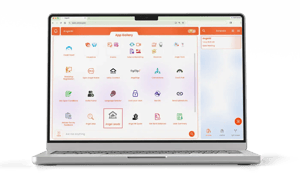
angelai app gallery mockup


How to Search for Leads in AngelAi

Follow these steps to choose a lead type, enter your ZIP codes, filter your results, and purchase the leads you want.

1

Sign Up for Your Free AngelAi Account

AngelAi
Ready to get more real estate leads?

Create your free AngelAi account and get started in minutes.

Sign Up Free

Create your free AngelAi account using the signup link.

2

Open the Smart App Gallery

Smart App Gallery
Training Videos

Once you’re inside AngelAi, click the Smart App Gallery button.

3

Click Angel Leads

🏠 Angel Leads

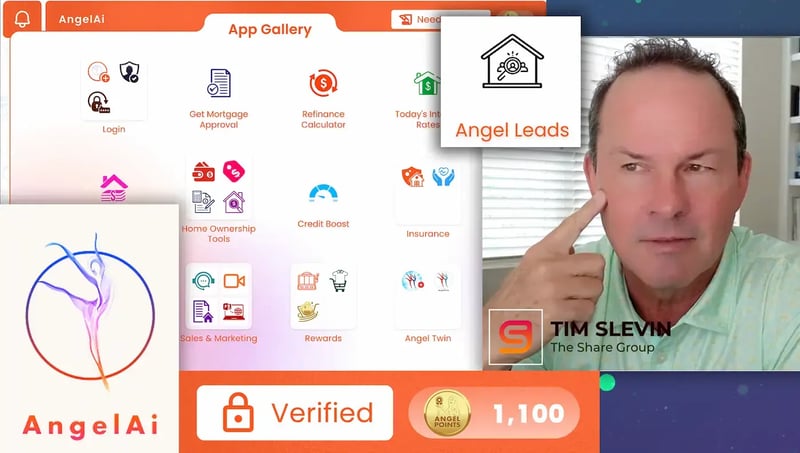
Inside the App Gallery, find and click Angel Leads.

4

Watch the Tutorial or Dive In

Watch tutorial video
Dive In

To begin searching for leads, click Dive In.

5

Choose Your Data Type

Absentee Owners
All Homes
Distressed Properties
Divorced
Downsizers
Likely to Sell

For this example, choose Absentee Owners.

6

Enter Your ZIP Codes

AngelAi will ask you to enter multiple ZIP codes separated by commas.

68044

Demo ZIP codes: 68044

7

Choose Whether You Require Email Addresses

Do you want only data with an email address?
Yes
No

Demo selection: No

8

Choose Whether to Include DNC Numbers

Should we include phone numbers on the Do Not Call list?
Yes
No

Demo selection: No

9

Review Available Leads

Based on your criteria, we found 28 data lines available.

Data Type: ABSENTEE

ZIP Code: 68044

Email Required: No

DNC Included: No

Availability can vary by ZIP code. AngelAi may only return results where matching data is available.
10

Confirm You Want to Purchase

Would you like to proceed with purchasing this data?
Yes
No

Click Yes to continue.

11

Enter How Many Leads You Want

How many would you like to purchase?
28

For this example, we entered 28.

12

Name Your List

What would you like to name this list?
Absentee in 68044

Name your list so it’s easy to identify later inside your AngelAi account.

13

Review Your Order Summary

Order Summary


Data Type: ABSENTEE

ZIP Code: 68044

Email Required: No

DNC Included: No

List Name: Absentee in 68044


Quantity: 28 data lines

Price Per Data Line: $0.25


Total Cost: $7

Review all details before completing your purchase.

14

Choose How You Want to Pay

Angel Points
💳 Credit Card
You can pay using Angel Points or by credit card, depending on your selected payment method.
15

Submit Your Order

✓ Your lead request has been submitted.

AngelAi will process your request and notify you when your leads are ready.

 

You’re All Set

AngelAi will process your request and notify you when your leads are ready. You can find your lists and track orders inside your AngelAi account.
Go to AngelAi

Pricing & Packages

Choose the package that matches your growth stage, from testing a campaign to building a more consistent outbound pipeline.

Launch Package

$300 One-time package
1,500 targeted homeowner leads
AngelAi ISA live calling support
Access to the AngelAi platform
Great for testing a market or campaign
No long-term commitment
What to expect: Test your market, start conversations, and generate your first opportunities.

Pipeline Pro Package

$2,000/ per month
Built for experienced agents ready to scale
10,000 targeted homeowner leads per month
Dedicated ISA focused on your campaigns
Ongoing outbound calling and follow-up
Designed for consistent seller conversations
Priority support and campaign optimization
What to expect: More conversations, more follow-up, and a more predictable listing pipeline.

Ready to Try This in Your Market?

Start with free leads and calling, then follow the exact steps above to generate your first opportunities.

Subscription Models
= Data Chaos

When thousands of records hit your system every month, your data quality and clarity start to fall apart.
  1. You get flooded with low context data
    BatchLeads encourages volume. You accumulate huge lists that are difficult to segment or prioritize.
  2. Your database gets older every month
    Without full refreshes, you end up calling data that is 6, 9, even 12 months old.
  3. Your CRM and dialer become cluttered
    Large monthly drops create duplicate records, overlapping campaigns, and confusion about which segment performs best.